Página inicial da aplicação
Na página inicial da aplicação (página inicial), verá uma síntese das informações importantes. A partir daqui, pode aceder a todos os módulos globais na navegação do lado esquerdo.
Para aceder à página inicial da aplicação, clique no logótipo no cabeçalho da aplicação.
Visão geral da navegação do cabeçalho

A navegação do cabeçalho no OpenProject está dividida em três secções:
Canto esquerdo:
- Módulos globais (ícone de grelha): abre o menu de acesso a todos os módulos globais.
- Logótipo da instância: apresenta o logótipo da sua instância atual.
Centro
- Consola de pesquisa: permite a pesquisa rápida de projetos, utilizadores, pacotes de trabalho ou outros recursos na aplicação.
Canto direito
- Botão +: cria novos projetos, utilizadores ou pacotes de trabalho.
- What’s new (gift icon): Shows the highlights of the current OpenProject release. A red dot on the icon shows that there is a new release you have not looked at yet. See What’s new.
- Ícone de notificações: mostra o número de notificações novas ou não lidas.
- Ajuda (ícone de ponto de interrogação): fornece acesso rápido a tutoriais, guias, vídeos e outros recursos de ajuda.
- Avatar da conta: abre ligações para a página pessoal, síntese da atividade, definições da conta, administração (se tiver direitos suficientes) e para terminar a sessão.
What’s new
Click the gift icon in the header to see what is new in the current release of OpenProject, for example What’s new in 18.0.
The menu shows:
- A link to the release video, if one is available.
- A list of the most important new features. Each feature has a short description and a link to the documentation, a blog post or a video.
When a new release is available, a red dot shows on the gift icon. The red dot goes away when you open the menu.
A blue dot marks each feature you have not opened yet. When you click a feature, the link opens in a new tab and the blue dot goes away.
Seven days after you first open the menu, the gift icon goes away. It shows again with the next release.
On mobile devices, the gift icon is not shown in the header. Open the menu through your account avatar and select What’s new in [version].
Nota
The What’s new menu is only available for logged-in users.
Visão geral da página inicial
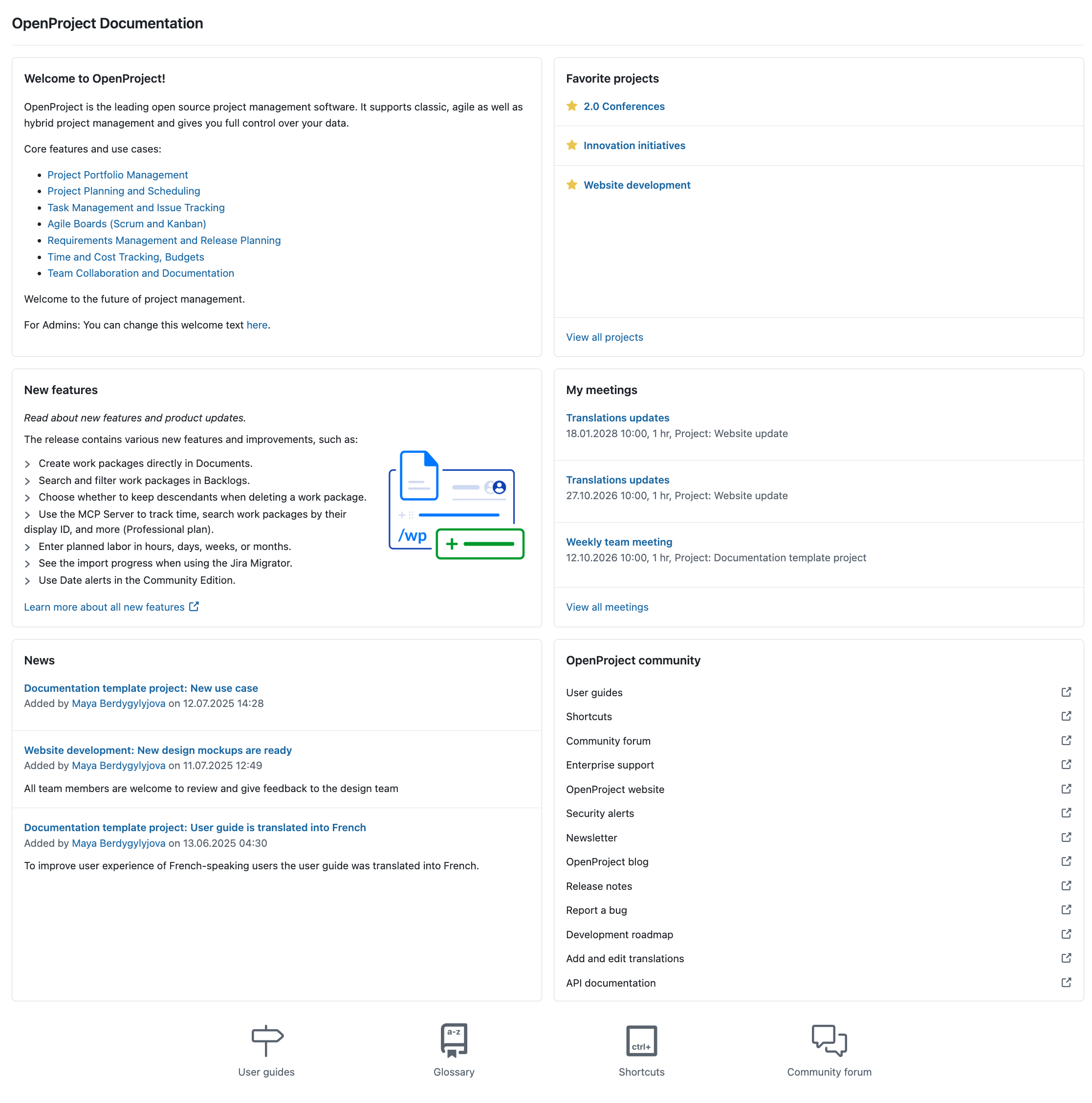
In the center/main part of the page, there are widgets:
- Bloco de texto de boas-vindas para dar as boas-vindas aos membros da sua equipa, partilhar informações importantes sobre o projeto ou qualquer outra informação. Pode configurar o bloco de texto de boas-vindas em -> Administração -> Definições do sistema -> Geral.
- The Favorite projects widget displays your favorite projects.
- The New features widget displays feature announcements and developments of the latest releases of OpenProject.
- The My meetings widget displays all scheduled meetings in which you are a participant.
- The News widget displays latest news from all your projects. Clique na ligação da notícia para ler os detalhes.
- The OpenProject Community widget displays links to important community information, such as release notes, forum, or the API documentation.
At the bottom of the page, there are links to additional resources: User guides, Glossary, Shortcuts, and the Community forum.