Application Home page
On the application home page (start page) you will get an overview about important information. From here you can access all global modules in the left hand navigation.
To get to the application home page, click on the logo in the header of the application.
Header navigation overview

The header navigation in OpenProject is divided into three sections:
Left corner:
- Global Modules (grid icon): Opens the menu to access all global modules.
- Instance Logo: Displays the logo of your current instance.
Center
- Search Console: Enables quick search for projects, users, work packages, or other resources within the application.
Right corner
- + Button: Creates new projects, users, or work packages.
- What’s new (gift icon): Shows the highlights of the current OpenProject release. A red dot on the icon shows that there is a new release you have not looked at yet. See What’s new.
- Notifications icon: Shows the number of new or unread notifications.
- Help (question mark icon): Provides quick access to tutorials, guides, videos, and other help resources.
- Account avatar: Opens links to personal page, activity overview, account settings, administration (if you have sufficient rights), and signing out.
What’s new
Click the gift icon in the header to see what is new in the current release of OpenProject, for example What’s new in 18.0.
The menu shows:
- A link to the release video, if one is available.
- A list of the most important new features. Each feature has a short description and a link to the documentation, a blog post or a video.
When a new release is available, a red dot shows on the gift icon. The red dot goes away when you open the menu.
A blue dot marks each feature you have not opened yet. When you click a feature, the link opens in a new tab and the blue dot goes away.
Seven days after you first open the menu, the gift icon goes away. It shows again with the next release.
On mobile devices, the gift icon is not shown in the header. Open the menu through your account avatar and select What’s new in [version].
Note
The What’s new menu is only available for logged-in users.
Home page overview
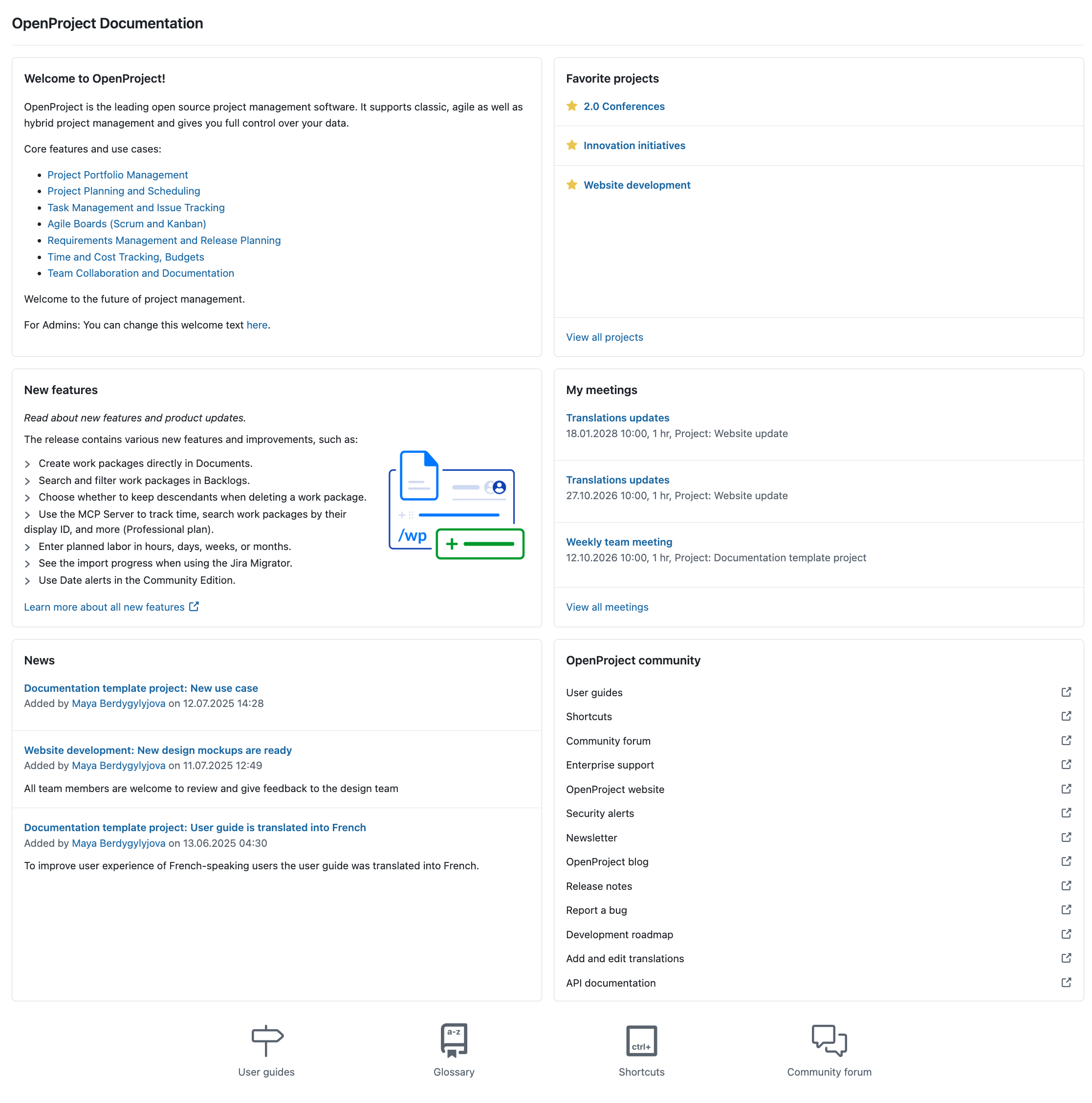
In the center/main part of the page, there are widgets:
- Welcome text block to welcome your team members, share important project information, or any other information. You can configure the welcome text block under -> Administration -> System settings -> General.
- The Favorite projects widget displays your favorite projects.
- The New features widget displays feature announcements and developments of the latest releases of OpenProject.
- The My meetings widget displays all scheduled meetings in which you are a participant.
- The News widget displays latest news from all your projects. Click on the link of the news to read the details.
- The OpenProject Community widget displays links to important community information, such as release notes, forum, or the API documentation.
At the bottom of the page, there are links to additional resources: User guides, Glossary, Shortcuts, and the Community forum.