Backlog-Einstellungen
In OpenProject können Sie die Einstellungen für Backlogs projektspezifisch konfigurieren. Navigieren Sie zu Projekteinstellungen -> Backlogs.
Typen und Status
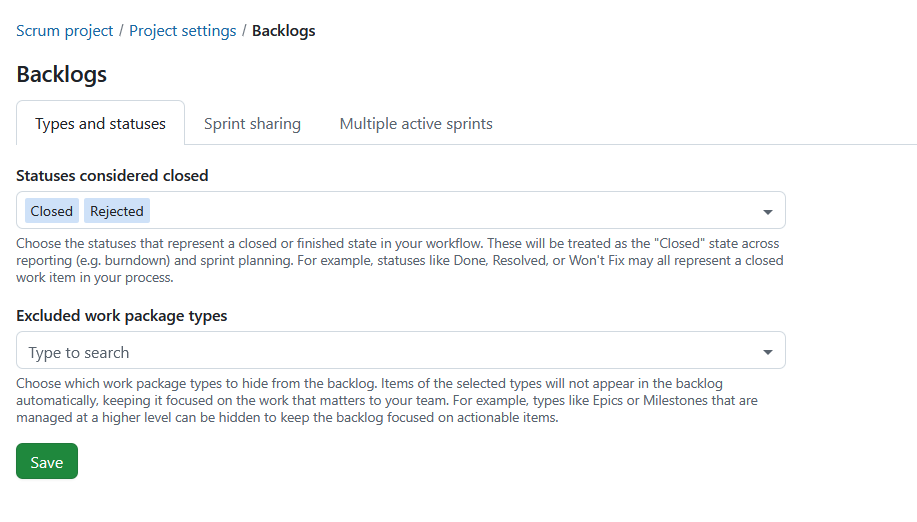
Auf der Registerkarte Typen und Status können Sie konfigurieren, welche Arbeitspaket-Status als abgeschlossen gelten und welche Arbeitspaket-Typen von Backlog-Ansichten ausgeschlossen sind.
Als abgeschlossen geltende Status
Sie können die Status auswählen, die einen abgeschlossenen oder beendeten Zustand in Ihrem Workflow darstellen.
Diese Status werden im Rahmen der Sprintplanung und -berichterstattung als „abgeschlossen“ behandelt. Sie werden bei der Erstellung von Burndown-Charts verwendet und legen fest, welche Arbeitspakete nach Abschluss eines Sprints noch übrig bleiben.
Beispiele hierfür sind:
- Fertig
- Gelöst
- Zurückgewiesen
- Wird nicht gefixt
Status, die den globalen Metastatus Geschlossen verwenden, werden immer als geschlossen behandelt und können nicht entfernt werden.
Ausgeschlossene Arbeitspaket-Typen
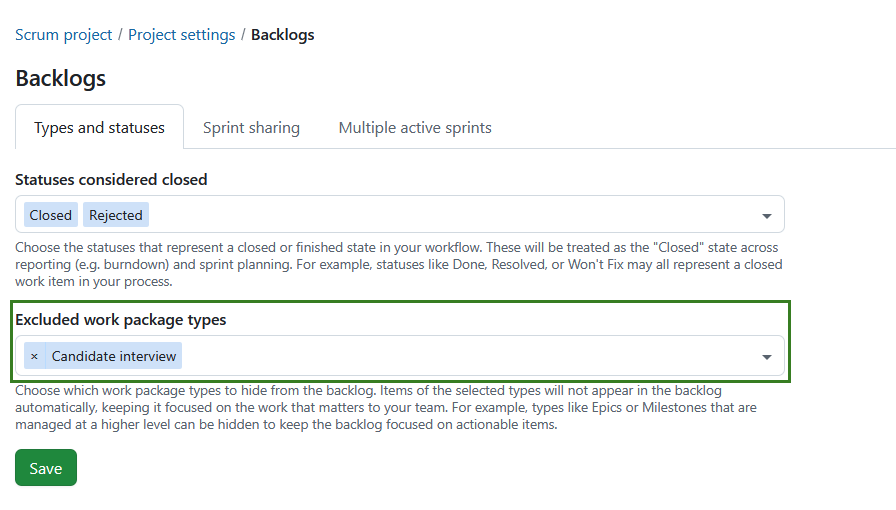
Sie können wählen, welche Arbeitspaketarten aus dem Indexbacklog und den Backlog buckets ausgeblendet werden sollen.
Ausgeschlossene Arbeitspaket-Typen
- erscheinen nicht im Posteingang.
- erscheinen nicht in den Backlog Buckets.
- erscheinen weiterhin in Sprints.
- erscheinen weiterhin auf den Sprint-Boards.
Dies kann für Arbeitspaket-Typen nützlich sein, die auf einer höheren Ebene verwaltet werden, wie z.B. Epics oder Milestones.
Wählen Sie einen oder mehrere Arbeitspakettypen aus der Liste der im Projekt verfügbaren aktiven Arbeitspakettypen.
Hinweis
Die Auswahl ist projektspezifisch und wird kopiert, wenn ein Projekt kopiert wird.
Klicken Sie auf den Speichern Button, um Ihre Änderungen zu sichern.
Sprints teilen

Die Sprintfreigabe ist eine Einstellung auf Projektebene, mit der Sie festlegen können, ob Sprints projektübergreifend freigegeben werden sollen.
Hinweis
Dies ist keine Einstellung auf Sprint-Ebene, wie es derzeit bei Versionen der Fall ist.
Die gemeinsame Nutzung von Sprints ermöglicht es Teams, die an mehreren Projekten arbeiten, ihre Arbeit auf koordinierte Weise zu planen und zu verfolgen. Anstatt in jedem Projekt separate, unzusammenhängende Sprints zu verwalten, können Sie einen Sprint einmal definieren und ihn projektübergreifend wiederverwenden. Dies ist besonders nützlich für teamübergreifende Scrum-Konfigurationen, skalierte agile Umgebungen oder wenn mehrere Teams zu demselben Inkrement beitragen.
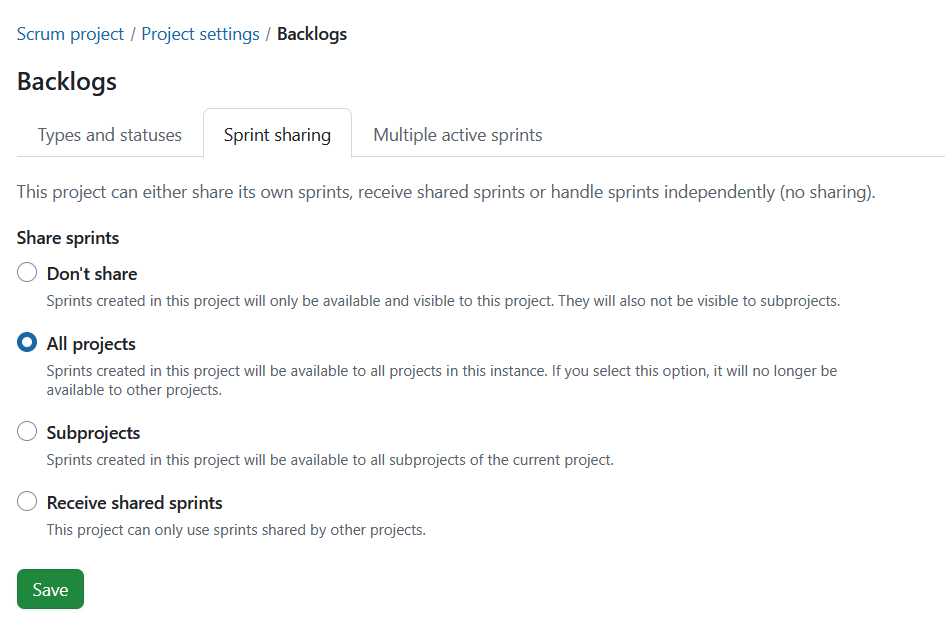
Je nach gewählter Option kann ein Projekt entweder Sprints für andere bereitstellen, gemeinsame Sprints verwenden oder unabhängig bleiben:
Nicht teilen: Dies ist die Standardeinstellung für Projekte. Sprints können in diesem Projekt erstellt werden und sind nur innerhalb dieses Projekts verfügbar und sichtbar. Keiner der erstellten Sprints wird mit einem anderen Projekt oder Unterprojekt geteilt.
Sprints teilen: Sprints können in diesem Projekt erstellt und entweder mit allen Projekten oder Unterprojekten geteilt werden:
-
Alle Projekte: Wenn Sie diese Option wählen, sind die erstellten Sprints für alle Projekte innerhalb der Instanz verfügbar. Es bedeutet auch, dass kein anderes Projekt Sprints mit allen Projekten teilen kann.
-
Unterprojekte: Sprints, die in diesem Projekt erstellt werden, sind für alle Unterprojekte des aktuellen Projekts verfügbar.
Geteilte Sprints erhalten: Innerhalb dieses Projekts können keine Sprints erstellt werden. Stattdessen können nur Sprints, die von einem anderen Projekt geteilt werden, verwendet werden.
Je nach Ihren Berechtigungen sind einige freigegebene Sprint-Felder möglicherweise schreibgeschützt. Projektspezifische Felder, wie beispielsweise das Sprint-Ziel, können weiterhin unabhängig voneinander bearbeitet werden.
Was wird geteilt
Wenn Sprints geteilt werden, wird auch der Sprint selbst projektübergreifend genutzt. Dies beinhaltet:
- Sprint-Name
- Start- und Enddatum
- Sprint-Status (z.B. Planung, aktiv, abgeschlossen)
Dadurch wird sichergestellt, dass alle teilnehmenden Projekte mit der gleichen Sprint-Definition und dem gleichen Zeitplan arbeiten.
Was nicht geteilt wird
Die folgenden Punkte bleiben projektspezifisch:
- Arbeitspakete verbleiben in ihren jeweiligen Projekten
- Backlogs und ihre Struktur bleiben projektspezifisch
- Sprint-Ziele sind weiterhin projektspezifisch
- Berechtigungen und Sichtbarkeit werden weiterhin pro Projekt verwaltet
Auch bei gemeinsamen Sprints behält jedes Projekt seine eigenen Arbeitsaufgaben und seine eigene Konfiguration.
Lesen Sie mehr über wie man mit Backlogs in OpenProject arbeitet.
Mehrere aktive Sprints
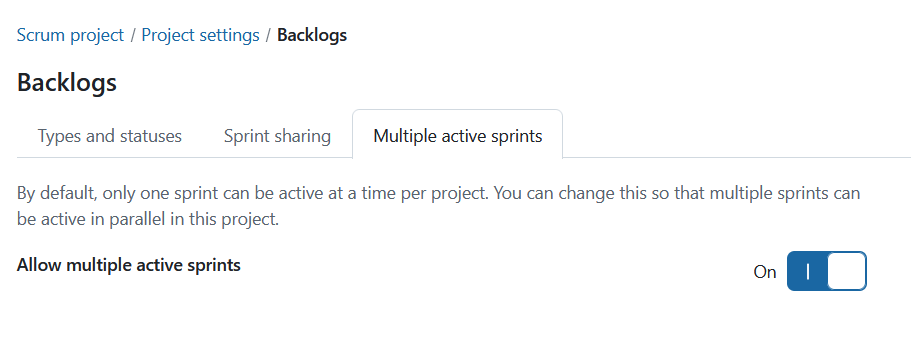
„Mehrere aktive Sprints“ ist eine Einstellung auf Projektebene, mit der Sie innerhalb eines Projekts mehr als einen aktiven Sprint aktivieren können. Um diese Einstellung zu aktivieren, schalten Sie den Schalter „Mehrere aktive Sprints zulassen“ auf „Ein“.
Hinweis
Es ist nur dann möglich, mehrere aktive Sprints zu haben, wenn das Projekt weder Sprints teilt noch Sprints erhält. Um diese Einstellung zu aktivieren, muss auf der Registerkarte „Sprint-Freigabe“ die Option „Nicht freigeben“ ausgewählt sein.