Wiki
OpenProject offers two different ways to work with project documentation:
- Project wiki – the built-in OpenProject wiki described on this page.
- External wiki providers – integrations with external documentation platforms, including XWiki.
This page explains how to use the OpenProject wiki.
If you want to connect an external documentation platform such as XWiki to your projects, see the documentation on external wiki providers setup.
Wiki is the built-in OpenProject module for collaboratively creating and editing project documentation. It uses GitHub-flavored CommonMark (GFM) and must be enabled in the project settings before it can be used.
For organizations that prefer to manage documentation outside of OpenProject, external wiki providers such as XWiki can be connected through an integration.
| Sujet | Contenu |
|---|---|
| Create and edit wiki pages | Create, edit, organize, and manage wiki pages. |
| Wiki navigation | Navigate and organize wiki pages within a project. |
| Wiki FAQ | Frequently asked questions about the wiki. |
Enable project wiki
The project wiki can be enabled for each project individually.
To use the internal wiki, it must first be enabled on your OpenProject instance and then enabled for the project under the project settings.
Editing wiki pages
Wiki pages use the OpenProject WYSIWYG editor, powered by CKEditor 5. The editor supports GitHub-flavored CommonMark (GFM), allowing you to create rich documentation with formatting, images, tables, links, and macros.
Most editing features are available throughout OpenProject. For detailed information about:
- text formatting
- images
- tables
- links
- macros
- keyboard shortcuts
- supported editor features
see the WYSIWYG editor guide.
Wiki-specific features
The wiki includes additional features that are only available when editing wiki pages.
Wiki-specific elements
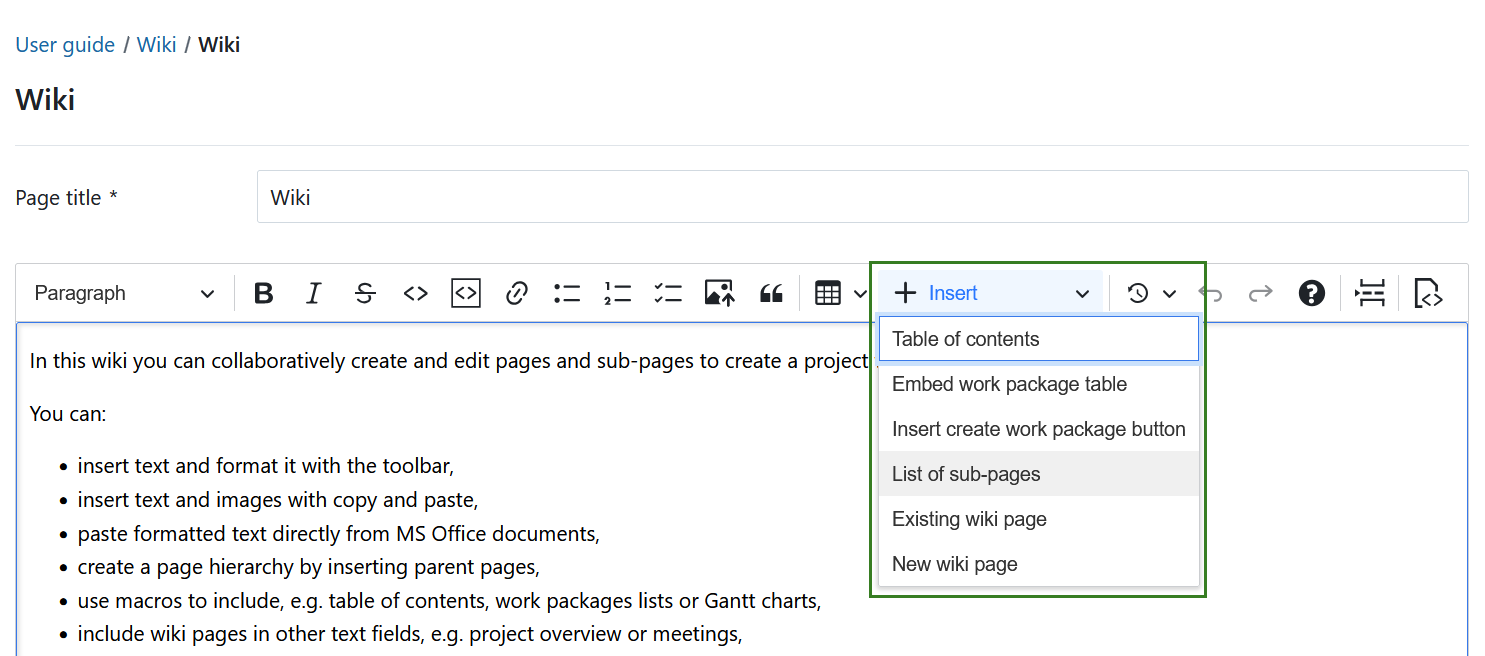
Click + Insert in the toolbar to access the following wiki-specific macros:
- List of sub-pages – inserts a hierarchical list of all child pages. This macro is only available when editing wiki pages.
- Existing wiki page – inserts a link to an existing wiki page.
- New wiki page – creates and inserts a link to a new wiki page.
The Existing wiki page and New wiki page macros are also available in other rich text editors in OpenProject, including meeting descriptions and outcomes, comments, and custom fields of type Text.
Conseil
For more information about using macros, see our How to use macros blog article.
Wiki page links
You can also create links to wiki pages using the following syntax:
[[Wiki page]]
[[Wiki page|Link text]]
[[Project identifier:Wiki page]]