OpenProject 17.4 est disponible et, comme annoncé dans notre blog, Jira Migrator est désormais disponible sans feature flag et permet la migration des champs personnalisés de base. C’est un grand pas vers une migration Jira complète, sur laquelle l’équipe d’OpenProject travaille actuellement. La version 17.4 introduit également les buckets de backlog et d’autres améliorations pour la gestion de projets agiles.
Dans cet article, nous mettons en évidence les changements les plus importants et ce qu’ils signifient pour votre travail quotidien. Et comme toujours, vous pouvez consulter nos notes de version qui contiennent toutes les modifications, fonctionnalités et corrections de bugs.
Une navigation rapide dans les articles :
- Jira Migrator
- Améliorations agiles : buckets de backlog, glisser-déposer amélioré et plus encore
- Autres améliorations importantes avec OpenProject 17.4
Jira Migrator
La plupart d’entre vous savent que Jira Data Center atteindra sa fin de vie (EOL) le 28 mars 2029. Après cette date, les licences et applications Data Center expireront et passeront en lecture seule, ce qui signifie que l’hébergement cloud sera la seule option prise en charge. Les équipes du monde entier sont donc à la recherche d’une alternative à Jira : un outil hautement fonctionnel qui offre des options d’hébergement flexibles et leur permet de contrôler pleinement leurs données.
Cependant, la migration vers un nouvel outil peut présenter des défis, allant de tâches fastidieuses à des problèmes techniques complexes. C’est pourquoi OpenProject développe un outil qui rendra la transition facile : Jira Migrator. Cette solution prête à l’emploi permet aux équipes de migrer leurs données de Jira vers OpenProject grâce à un dialogue simple et convivial. Pour en savoir plus, veuillez consulter notre documentation sur Jira Migrator.
Avec la sortie d’OpenProject 17.4, Jira Migrator est disponible sans feature flag, mais reste en version bêta : nous vous encourageons à le tester et à nous faire part de vos retours, mais nous ne recommandons pas son utilisation dans des environnements de production. Cependant, cette étape représente un jalon important pour nous, car elle nous permettra d’encourager encore plus de personnes à essayer Jira Migrator.

Nous comprenons qu’il est important que Jira Migrator soit pleinement fonctionnel, c’est pourquoi nous l’avons pleinement intégré à notre feuille de route. À chaque version, nous introduisons de nouvelles fonctionnalités et améliorations afin de rendre la migration aussi facile que possible pour le plus grand nombre d’équipes.
Pour obtenir des informations exclusives sur Jira Migrator et tous les sujets relatifs à la migration de Jira, veuillez nous contacter et nous vous inscrirons à la newsletter dédiée. Vous pouvez également nous suivre sur les réseaux sociaux pour obtenir les dernières actualités d’OpenProject.
Nouveau dans la version 17.4 : Jira Migrator importe les champs personnalisés de base
La principale nouveauté de la version 17.4 est qu’il est désormais possible de migrer les champs personnalisés de Jira vers OpenProject. Ceci s’applique aux fichiers personnalisés qui ont un type de champ correspondant dans OpenProject, tels que le texte, les nombres, les dates et les listes de sélection.

Il s’agit d’une autre étape importante vers la mise à disposition d’un assistant de migration Jira complet et convivial. La possibilité de transférer les champs personnalisés est une fonctionnalité clé ici, car elle permet aux organisations et aux équipes disposant de configurations de gestion de projet très personnalisées d’effectuer la transition avec un minimum d’efforts.
Pour rendre une migration aussi facile que possible, il faut non seulement un logiciel de qualité, mais aussi un guide fiable sur la façon de l’utiliser. Nous vous fournissons un manuel d’instruction détaillé qui vous guide pas à pas dans le dialogue de migration et explique chaque fonction en détail.
Déjà avec les versions précédentes, il était possible de migrer des projets, des problèmes (avec nom, titre, description, pièces jointes), des utilisateurs (avec nom, adresse e-mail, appartenance au projet), des statuts et des types de Jira vers OpenProject. Et ce n’est pas fini ! Nous travaillons continuellement à l’amélioration de Jira Migrator en ajoutant de nouveaux types de données et en améliorant le processus de migration en lui-même.
Dans le cadre de notre processus de développement de Jira Migrator, nous collectons des échantillons de données anonymes afin de tester et de valider les capacités d’importation dans des conditions réelles. N’hésitez pas à nous contacter si vous souhaitez faire don de vos données. Nous signerons un accord de confidentialité.
Améliorations agiles : buckets de backlog, un meilleur glisser-déposer et plus encore
Chez OpenProject, nous utilisons nous-mêmes des flux de travail agiles et nous comprenons l’importance d’une utilisation intuitive et de fonctionnalités fiables pour simplifier la gestion de la charge de travail.
In this release, we are focusing on speeding up the organization of the backlog and sprint planning process by providing backlog buckets and improved backlog interactions to simplify workflows for agile teams in OpenProject. Individual customization options are particularly important to us, as they support the specific needs of agile teams.
Cette version fait partie de notre objectif continu de soutenir le travail agile dans OpenProject, que nous avons également souligné dans notre récent article de blog « L’avenir du travail agile ».
Organiser avec les buckets de backlog
Lorsque le backlog est long et non structuré, il peut s’avérer difficile de suivre les lots de travaux et de planifier le prochain sprint efficacement. Sans une vue d’ensemble claire, les équipes passent souvent trop de temps à rechercher des éléments et à passer d’une vue à l’autre.
Avec OpenProject 17.4, nous introduisons les buckets de backlog, qui offrent une nouvelle façon de structurer votre backlog. Les lots de travaux peuvent désormais être regroupés dans des listes clairement définies, ce qui facilite l’organisation et la hiérarchisation des travaux à venir. Dans chaque bucket, les lots de travaux peuvent être triés et ajustés en fonction de l’évolution des priorités. Chaque bucket peut être nommé individuellement, ce qui permet aux équipes de créer des catégories adaptées à leur flux de travail.
Les buckets de backlog garantissent un backlog organisé, structuré en sections gérables. Les équipes et les planificateurs de sprint peuvent se regrouper en fonction de leurs besoins spécifiques, ce qui facilite la planification et la hiérarchisation de leur travail.

Amélioration des interactions avec le backlog pour une planification plus rapide
Travailler avec des backlogs nécessite des interactions rapides et efficaces. Lorsque le déplacement des lots de travaux ou la vérification des informations implique trop d’étapes, la planification devient lente et fragmentée.
Avec OpenProject 17.4, nous avons amélioré la façon dont vous interagissez avec le module Backlogs. Les lots de travaux sont désormais entièrement déplaçables, ce qui facilite leur déplacement lors de l’affinage du backlog et de la planification des sprints. Parallèlement, vous pouvez toujours ouvrir les lots de travaux dans un panneau latéral d’un simple clic, ce qui vous permet d’afficher et de modifier les détails sans perdre le contexte.
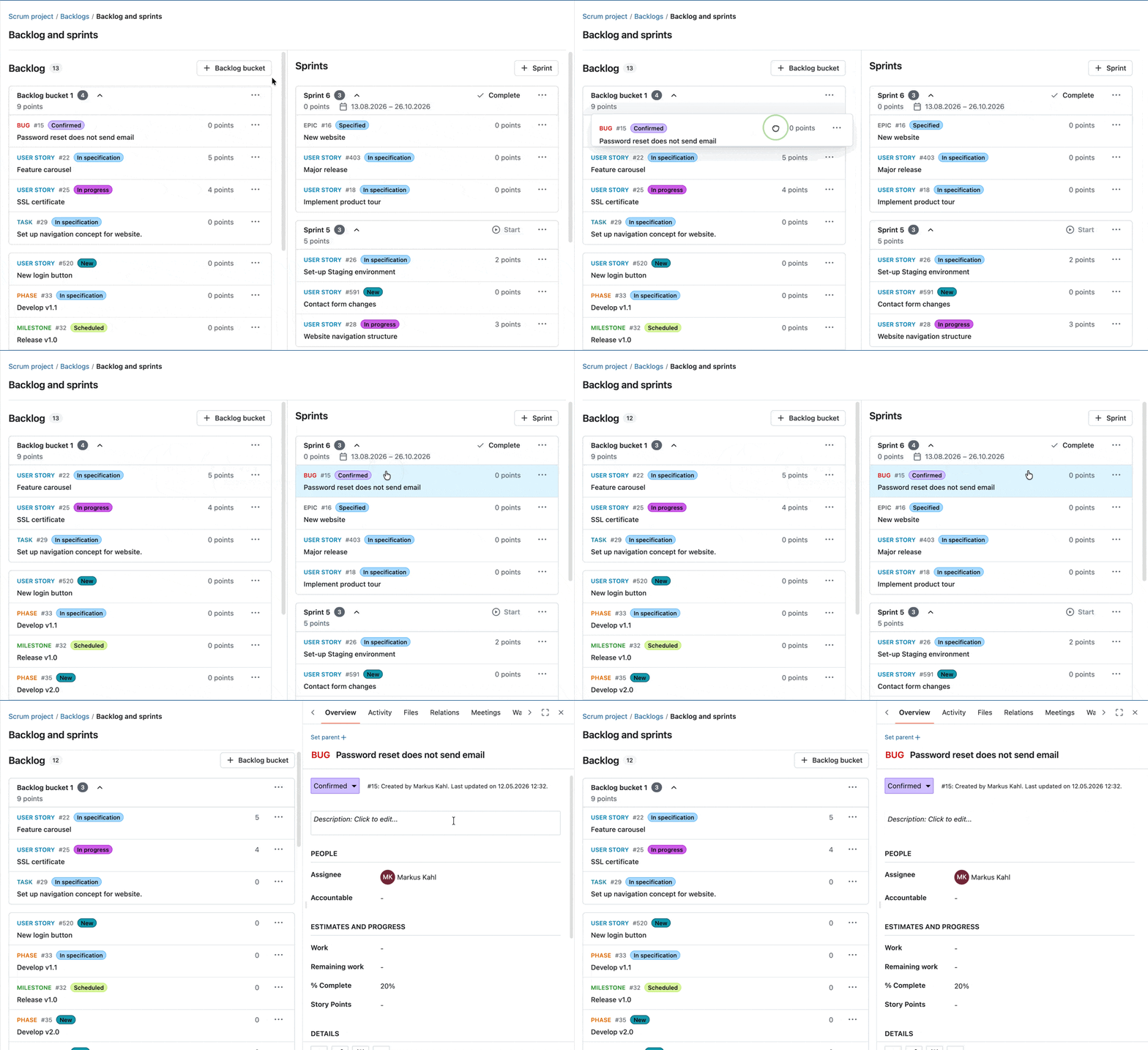
Ces améliorations vous permettent de passer en toute transparence de la planification à l’exécution, en rendant l’affinage du backlog plus rapide et plus intuitif.
Nouveau bouton d’action dans l’en-tête du sprint
Avec OpenProject 17.4, vous pouvez maintenant démarrer ou terminer des sprints directement à partir de l’en-tête du sprint en utilisant des boutons d’action dédiés. Cela facilite l’accès à ces actions et améliore la visibilité de ce que vous pouvez faire ensuite dans votre flux de travail du sprint.

Veuillez également consulter notre documentation pour en savoir plus sur le module Backlogs d’OpenProject.
Autres améliorations importantes avec OpenProject 17.4
OpenProject 17.4 offre davantage de fonctionnalités et de mises à jour. Pour que cet article reste concis, voici un aperçu rapide de quelques améliorations supplémentaires qui méritent d’être soulignées :
Copier les paramètres du flux de travail entre les rôles
Les paramètres de flux de travail d’un projet peuvent désormais être copiés d’un rôle vers d’autres rôles grâce à une boîte de dialogue dédiée. Il est ainsi plus facile d’appliquer des flux de travail cohérents entre les différents rôles et de réduire les efforts de configuration manuelle.
Widget « Mes réunions » sur les pages d’accueil et de présentation du projet
Un nouveau widget « Mes réunions » affiche désormais vos réunions à venir directement sur la page d’accueil. Il affiche les informations les plus pertinentes en un coup d’œil et vous permet d’accéder rapidement aux réunions à venir.
OpenProject 17.4 : migration, installation, mises à jour et assistance
Suivez le guide de mise à jour pour l’installation par paquet ou l’installation Docker pour mettre à jour votre installation OpenProject vers OpenProject 17.4. Nous mettons à jour vos environnements OpenProject hébergés (Enterprise cloud) aujourd’hui, le 13 mai 2026.
Vous trouverez plus d’informations sur toutes les nouvelles fonctionnalités et les changements dans nos Notes de version et dans la Documentation d’OpenProject.
Si vous avez besoin d’aide, vous pouvez poser vos questions dans le forum Community, ou si vous avez droit à l’assistance Enterprise, contactez-nous et nous nous ferons un plaisir de vous aider personnellement.
- Vous débutez avec OpenProject ? Pour tester immédiatement toutes les fonctionnalités d’OpenProject 17.4, créez une instance d’essai gratuite de 14 jours pour notre cloud Enterprise OpenProject.
- Vous préférez utiliser OpenProject 17.4 dans votre propre infrastructure ? Vous trouverez ici les instructions d’installation pour OpenProject.
- Vous souhaitez passer d’une version Community à une version Enterprise ? Obtenez un jeton d’essai gratuit de 14 jours pour tester les add-ons Enterprise (toutes les formules).
Crédits
Nous remercions tout particulièrement la ville de Cologne, le Helmholtz-Zentrum Berlin pour le parrainage des fonctionnalités publiées ou à venir. Votre soutien, ainsi que les efforts de notre formidable communauté, contribuent à ces innovations. Un grand merci également aux membres de notre communauté qui nous signalent les bugs, et qui nous aident à les identifier et à les corriger. Nous remercions tout particulièrement Andreas H., Madhu Reddy et Anna Mund pour avoir signalé et trouvé des bugs.
Nous tenons également à remercier le contributeur communautaire K. Uihlein pour avoir contribué à notre documentation sur l’intégration d’OpenProject GitLab. Ce sera très apprécié.
Et pour finir, nous remercions chaleureusement nos traducteurs et traductrices très engagés sur Crowdin, qui ont traduit de nombreuses chaînes OpenProject. Pour cette version, nous tenons à remercier tout particulièrement les utilisateurs suivants :
- Samo, pour un grand nombre de traductions en turc.
- NCAA, pour un grand nombre de traductions en danois.
- Christophe Gesché, pour un grand nombre de traductions en français.
Vous souhaitez participer aux traductions ? Consultez notre guide de traduction et découvrez comment vous pouvez apporter votre contribution. Elle sera très appréciée !
Comme toujours, nous vous invitons à nous faire part de vos commentaires concernant cette version.