OpenProject 17.0: Real-time documents collaboration and much more
OpenProject 17.0 has been released and introduces several major improvements across the platform. In this article, we highlight the most important changes and what they mean for your daily work.
As this is a major release with many updates, we focus on the key highlights here. For a complete overview of all features, changes, and bug fixes, please see our release notes.
A quick article navigation:
-
Better meetings, less overhead: Draft and presentation modes, outcomes, and iCal
-
Programs and portfolios for strategic structuring (Enterprise add-on)
-
Updated SharePoint integration with more restrictive permissions (Enterprise add-on)
Think together, create together: Real-time documents collaboration
Project ideas, decisions, and agreements are often formed together. At the same time, they tend to be spread across different tools and files. This makes it harder to keep context, align as a team, and connect written content to actual project work.
With OpenProject 17.0, teams can collaborate on documents in real time, directly in OpenProject. What does that mean? – Multiple users can edit a document at the same time and see each other’s changes instantly. This helps teams develop ideas together, align on content, and keep everything centrally available.
That central approach works especially well because most documents are closely connected to your tasks and projects. You can reference milestones and link work packages, making it easier to move from a shared text draft to an actionable project plan. This is especially useful for project-related documents such as concepts, contracts, specifications, or planning documents, where collaboration and traceability matter.
Good to know: The redesigned Documents module is built on BlockNote, a modern, open source text editor that is also used in other European open source projects such as LaSuite and openDesk. This creates a strong foundation for future collaboration features across OpenProject.
Important
Real-time collaboration in Documents is available out of the box for all plans using OpenProject Cloud or on-premises installations with Docker Compose, Kubernetes, or Helm. For package-based installations, real-time communication needs to be set up separately. Also relevant for on-premises installations using packages: The package source has been changed to packages.openproject.com.
If you want to learn more about the design decisions, technical background, and what’s planned next, read this blog article.

Better meetings, less overhead: Draft and presentation modes, outcomes, and iCal
Meetings are essential for coordination and decision-making — but preparing agendas, guiding discussions, and documenting results often require extra manual effort. This can make meetings feel fragmented and outcomes hard to follow up on.
OpenProject 17.0 improves meeting workflows by supporting teams before, during, and after a meeting, helping to keep everything structured in one place. Read more about meeting management with OpenProject in our user guide.
Planning a meeting: Draft mode
With draft mode, agendas can be created and refined collaboratively without notifying participants too early. This allows moderators to align internally before opening the meeting and sharing it with the full group.

Running a meeting: Presentation mode
Once the meeting starts, keeping discussions focused can be challenging. Presentation mode helps moderators guide participants through the agenda step by step, making it easier to stay on topic and ensure that all items are addressed in order.

Documenting results: Multiple outcomes
Capturing results is just as important as running the meeting itself. Meetings can now include multiple text-based outcomes, making it easier to document decisions, agreements, or next steps directly where they belong. These outcomes remain part of the meeting documentation and can be reviewed later.

Staying informed: iCal subscription
To support follow-up and planning, meetings can also be subscribed to via iCal, allowing participants to stay informed about schedules and updates in their personal calendar tools.
Together, these improvements help teams run meetings more efficiently, keep discussions structured, and ensure that results are clearly documented and accessible.
Structure projects consistently: Redesigned project home and improved template selection
Creating projects in a consistent way is essential, especially for organizations working with defined project standards such as PM² or PMflex. In practice, project information is often spread across different views, and project setup can be error-prone, particularly for non-technical administrators.
OpenProject 17.0 introduces a redesigned project home, now split into two dedicated tabs. This makes it easier to distinguish between high-level project information and operational details and helps teams understand a project’s structure at a glance. Please note that in addition to the redesign, the project overview page has been renamed to project home.

Project creation has also been improved. A clearer template selection guides users through the setup process and helps avoid common mistakes, even when projects are created by users without deep technical knowledge.

Note
These improvements lay the foundation for a planned multi-step project creation wizard in one of the next releases. The upcoming wizard aims to support the creation and processing of PM² / PMflex artifacts in a guided and user-friendly way. We plan to publish a preview article about this feature on our blog soon.
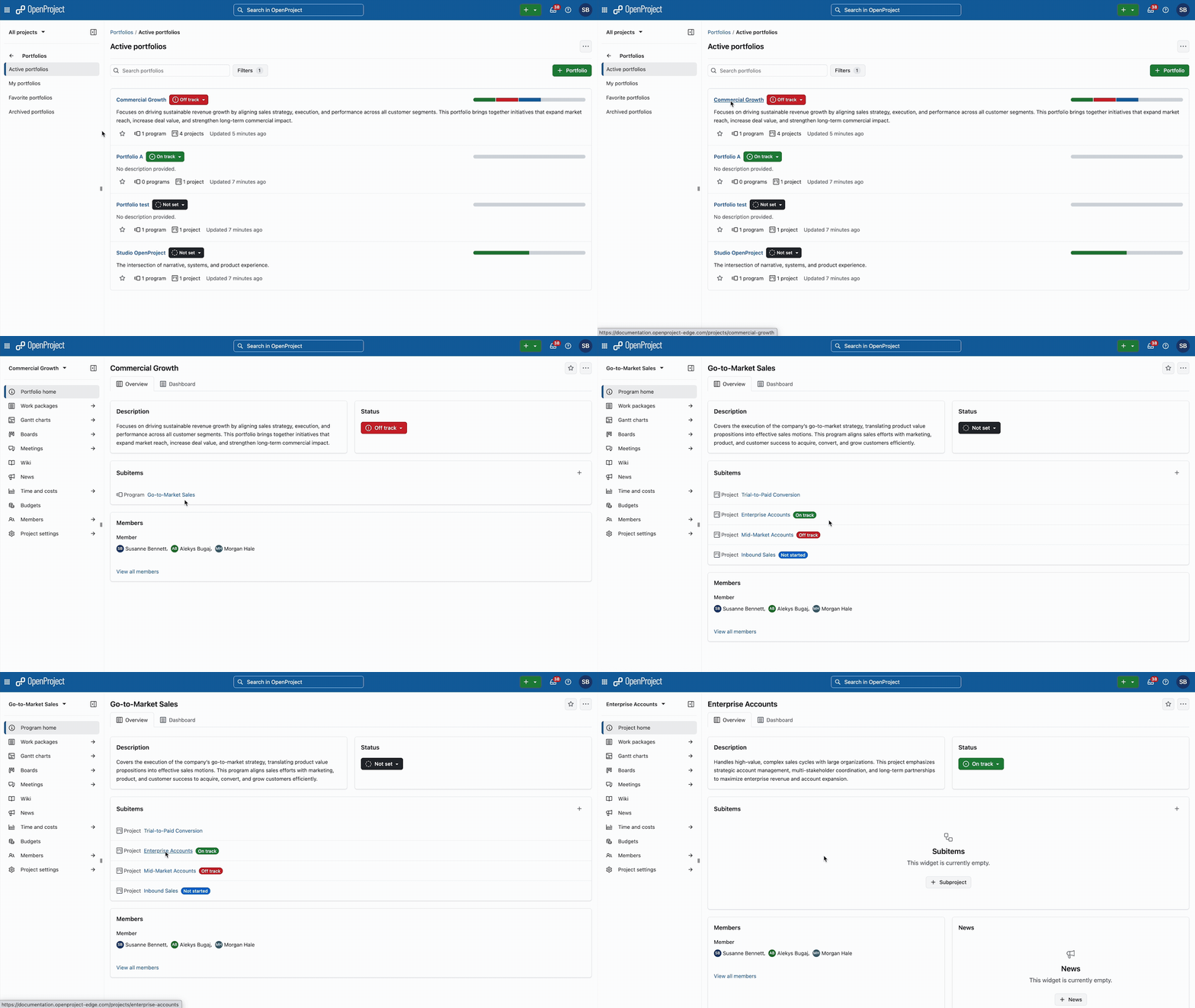
Manage projects at a strategic level: Programs and portfolios (Enterprise add-on)
As organizations grow, managing projects individually is often no longer enough. Strategic goals, dependencies, and priorities need to be visible across multiple projects — not just within them.
With programs and portfolios, OpenProject 17.0 helps organizations structure projects at a higher level. Related projects can be grouped into programs and portfolios to provide an overview of all ongoing initiatives. This makes it easier to align work with strategic goals, track progress across projects, and support informed decision-making.

This is particularly helpful for organizations working with PM² or PMflex, where projects are embedded in a broader strategic context and need to be managed consistently across portfolios and programs. PMOs, management teams, and public sector organizations benefit from increased transparency without adding complexity to day-to-day project work.
The feature is available as an Enterprise add-on in the Premium plan and integrates seamlessly with existing project structures in OpenProject. See our user guide to learn more about the portfolio module in OpenProject.
More control when connecting SharePoint: Updated SharePoint integration (Enterprise add-on)
Sharing and collaborating on documents across systems is common in many organizations — but it also raises questions around access control and data protection. Especially in regulated environments, it is important to clearly define who can see and edit which content.
With OpenProject 17.0, the existing SharePoint/OneDrive integration has been split into two separate integrations. This allows for more restrictive and clearer permission handling when connecting SharePoint content to OpenProject.
The updated SharePoint and OneDrive integrations are available as Enterprise add-ons in the Professional plan, just like before version 17.0. See our system admin guide to learn more about the SharePoint integration and now separate OneDrive integration for OpenProject.
Other great improvements
OpenProject 17.0 is a packed release. To keep this article concise, here is a quick look at some additional improvements worth highlighting:
Improved accessibility
Alt texts for images and improved chart colors make OpenProject more accessible and easier to use for everyone. See our Release Notes for more information on accessibility improvements.
Smarter global search and more precise autocompleters
The global search now includes additional context such as type and status, helping users find relevant content faster. As a positive side effect of that, several autocompleters have been improved to provide more accurate suggestions and reduce ambiguity when entering data. See our Release Notes for more information on smarter global search and more precise autocompleters.
More restrictive user privacy options
User visibility can now be restricted more strictly for people who are not members of the same project, supporting privacy-sensitive environments. See our Release Notes for more information on more restrictive privacy options.
Improved project attribute help texts
Project attributes now offer clearer help texts with captions and support more direct editing, making project setup easier to understand. See our Release Notes for more information on improved project attribute help texts.
Custom mobile logo (Enterprise add-on)
Organizations using the Enterprise Basic plan and higher can now use a custom logo in the OpenProject mobile app to better reflect their brand. See our Release Notes for more information on adding a custom mobile logo.
Required project attributes
Projects can now enforce required attributes, helping ensure consistent and complete project data. See our Release Notes for more information on required project attributes.
New permission to export projects
A dedicated permission now allows administrators to control who is allowed to export project data.
OpenProject 17.0: Migration, installation, updates and support
Follow the upgrade guide for the packaged installation or Docker installation to update your OpenProject installation to OpenProject 17.0. We update your hosted OpenProject environments (Enterprise cloud) today, January 14, 2026.
You will find more information about all new features and changes in our Release notes or in the OpenProject Documentation.
If you need support, you can post your questions in the Community Forum, or if you are eligible for Enterprise support, please contact us and we will be happy to support you personally.
- New to OpenProject? To test all features of OpenProject 17.0 right away, create a 14 days free trial instance for our OpenProject Enterprise cloud.
- Prefer to run OpenProject 17.0 in your own infrastructure? Here you can find the Installation guidelines for OpenProject.
- Want to upgrade from a Community version to try out the Enterprise add-ons? Get a 14 days free trial token to test the Enterprise add-ons (all plans).
Credits
A very special thank you goes to Helmholtz-Zentrum Berlin, City of Cologne, Deutsche Bahn and ZenDiS for sponsoring released or upcoming features. Your support, alongside the efforts of our amazing Community, helps drive these innovations. Also a big thanks to our Community members for reporting bugs and helping us identify and provide fixes. Special thanks for reporting and finding bugs go to Alexander Aleschenko, Stefan Weiberg, and Markus Preisinger.
Last but not least, we are very grateful for our very engaged translation contributors on Crowdin, who translated quite a few OpenProject strings! This release we would like to particularly thank the following users:
- stenberg.thomas, for a great number of translations into Swedish.
- natalianikolaieva1803, for a great number of translations into Ukrainian.
- Sharmin, for a great number of translations into Persian.
Would you like to help out with translations yourself? Then take a look at our translation guide and find out exactly how you can contribute. It is very much appreciated!
As always, we welcome any feedback on this release.